
Thinking about blogging on your Shopify store and wondering which app you actually need? Shopify gives you a blog, but a bare one: no templates, no table of contents, no related posts and no author page. So we put fifteen blog apps on real stores, from AI writers to builders and internal linking, to see which ones earn their place. Here are the 15 best Shopify blog apps in 2026:
| Tool | Best for | ||
|---|---|---|---|
| 1 |
 Bloggle: SEO Blog Builder Bloggle: SEO Blog Builder
|
Content-first stores that publish regularly and want posts to look designed, not pasted. | View → |
| 2 |
 Tapita SEO AI Blog Builder Tapita SEO AI Blog Builder
|
Beginners who want a keyword to become a published, SEO-checked article the same day. | View → |
| 3 |
 SEO Alpin : Internal Linking SEO Alpin : Internal Linking
|
Stores whose blog gets traffic but sends almost nobody to a product page | View → |
| 4 |
 SEOWILL: AI SEO & AI Blog Post SEOWILL: AI SEO & AI Blog Post
|
Stores that want blogging and technical SEO handled by the same app. | View → |
| 5 |
 Avada AI Content Blog Builder Avada AI Content Blog Builder
|
Stores that want research, outline and draft in one flow, on a free plan generous enough to judge it. | View → |
| 6 |
 Essential AI SEO: AI Blog Post Essential AI SEO: AI Blog Post
|
Stores that need twenty posts this month, not one perfect one. | View → |
| 7 |
 Auto Blogs Agent AI Blog Posts Auto Blogs Agent AI Blog Posts
|
Stores that want the blog on a schedule and will still read what goes out. | View → |
| 8 |
 autoBlogger | AI Blog Writer autoBlogger | AI Blog Writer
|
Stores that want the blog to be a sales channel, not a magazine. | View → |
| 9 |
 StoreSEO SEO & Image Optimizer StoreSEO SEO & Image Optimizer
|
Larger catalogues where blog SEO and product SEO need the same treatment. | View → |
| 10 |
 DropInBlog: Blog Engine DropInBlog: Blog Engine
|
Stores treating the blog as a real publication and willing to pay for the engine. | View → |
| 11 |
 BlogFeeder ‑ Blog Importer BlogFeeder ‑ Blog Importer
|
Merchants moving or mirroring an existing WordPress blog onto their store domain. | View → |
| 12 |
 Digital Darts: Related Posts Digital Darts: Related Posts
|
Blogs with enough posts and Search Console history to have something to lift. | View → |
| 13 |
 Blog Filter & Blog Search HUE Blog Filter & Blog Search HUE
|
Blogs big enough that readers need a way in other than the newest post. | View → |
| 14 |
 RuffRuff Table of Contents RuffRuff Table of Contents
|
Long-form guides where readers need to jump to the section they came for. | View → |
| 15 |
 Recipe Kit ‑ Blog Post Recipes Recipe Kit ‑ Blog Post Recipes
|
Food, drink and CPG stores whose recipes are the reason people arrive. | View → |
The 15 best Shopify blog apps in 2026
Bloggle: SEO Blog Builder
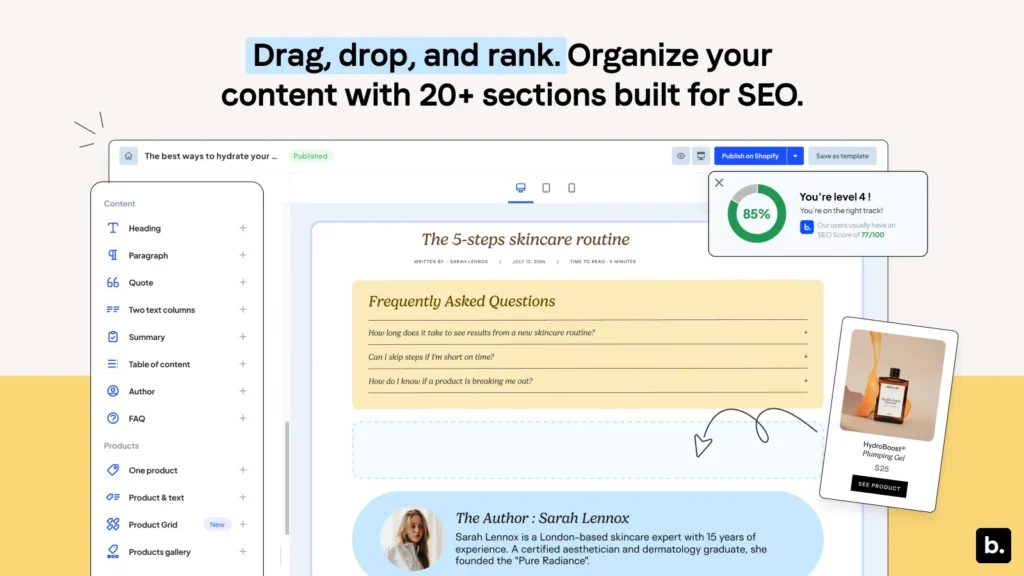
Design your blog, boost SEO & drive sales. Add a blog in minutes with templates, no code needed.
- Drag-and-drop blog editor, no coding needed
- Industry blog templates you can customise quickly
- Live SEO and UX scoring while you write
- Ready-made blocks: table of contents, FAQ, author bio, Klaviyo forms
- Embed store products and image galleries inside posts
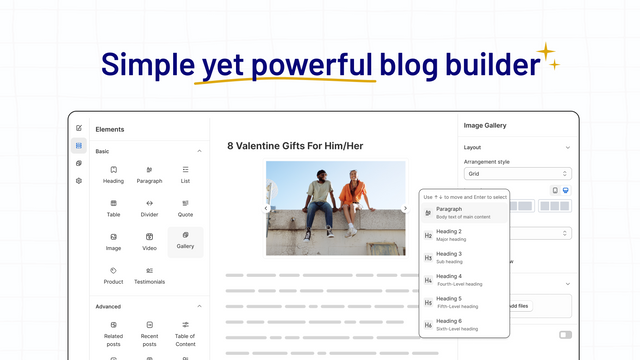
As a writing surface, Bloggle beat everything else we tried: real drag-and-drop editing, industry templates and live SEO scoring while you type, plus blocks that Shopify simply does not give you, like a table of contents, an FAQ and an author bio. Two structural gripes in the reviews are worth knowing before you commit. It shines on posts built inside Bloggle, but existing Shopify articles do not come across cleanly, and one merchant on the Eurus theme found it heavy on page performance. There is no free tier either, so you are paying from day one.
- The closest thing to a proper editor for Shopify blog posts
- Live SEO feedback while you write, not after you publish
- Conversion blocks built in: product embeds, FAQ, table of contents
- Existing Shopify articles do not migrate in cleanly, it is at its best on posts built inside the app
- One merchant on a heavy theme reported a page-speed cost, worth measuring before you commit
Best for: Content-first stores that publish regularly and want posts to look designed, not pasted.
“Shopify is super limiting in blog design, but this app has really elevated my blogs. Every time I have encountered a problem, the team has been quick to reply and sorted it for me.”Ferne Creative, United Kingdom
Tapita SEO AI Blog Builder
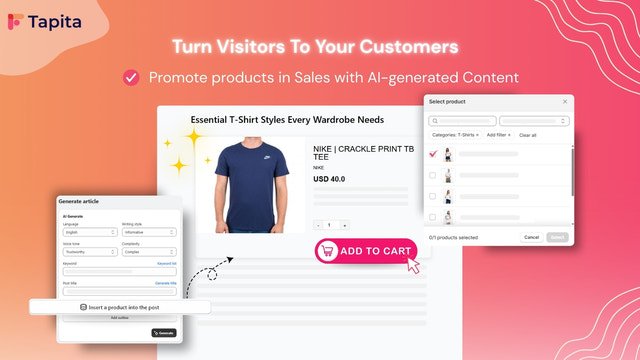
Generate SEO blog posts in minutes | Boost traffic, drive sales & design blogs easily with AI.
- AI drafts the title, the article and the images from a keyword
- Product content generated into the post to promote what you sell
- AI keyword suggestions to find topics worth writing about
- Bulk generation with daily or weekly scheduled publishing
- Multilingual posts from the same brief
Tapita is the one we would hand to someone who has never published a blog post. Give it a keyword and it drafts the article, generates the images and schedules a batch to go out weekly, with an SEO score that updates as you edit. Support gets named in review after review, and they set up your first post with you. Stability is the weak spot: a merchant blogging weekly reported something breaking every other week, with credits burned re-generating the same article.
- Keyword to published post in one pass, images included
- Bulk generate and schedule a month of posts at once
- Support that sets up your first article with you
- A merchant blogging weekly reported something breaking every other week, with credits spent on posts that came back buggy
- English-only interface, and heavier drafts can be slow to edit
Best for: Beginners who want a keyword to become a published, SEO-checked article the same day.
“The AI blog generator is incredibly easy to use and creates high-quality, SEO-optimised content with minimal effort. What truly stands out, though, is the outstanding customer support.”FABTAS STORE, United Kingdom
SEO Alpin : Internal Linking
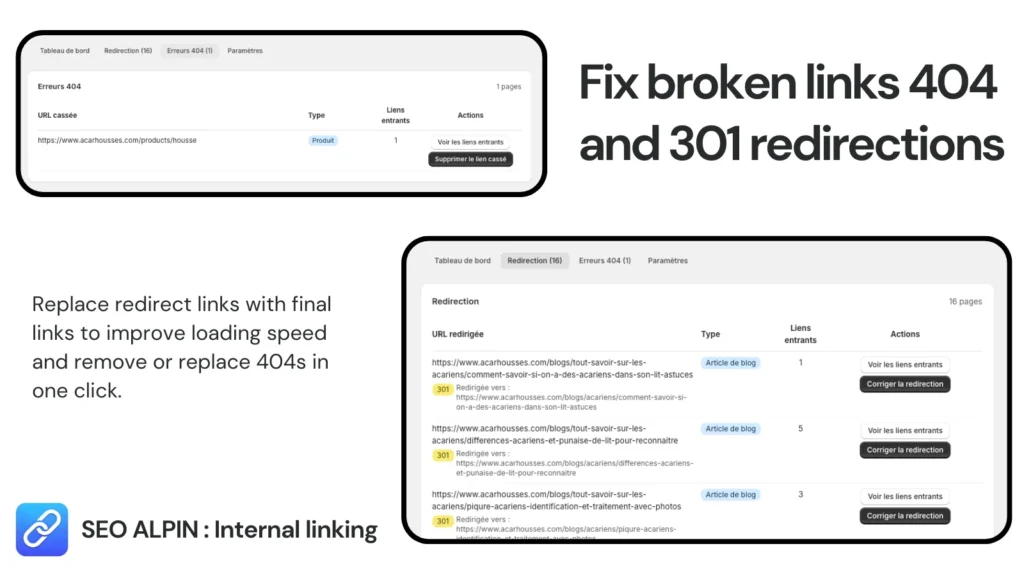
Improve internal linking SEO by automatically inserting links between your pages.
- Finds the pages and posts that almost nothing links to
- Surfaces semantically related pages using Search Console data
- Inserts internal links manually or in bulk
- Detects broken 404s and fixes them with 301 redirects
- AI picks the anchor text and the sentence the link belongs in
If you want to approve every link yourself, this one costs nothing. It reads your Search Console data to find under-linked and semantically related pages, blog posts included, suggests each link with an AI-chosen anchor and the sentence it belongs in, then inserts them one by one or in bulk. Broken 404s get fixed with 301 redirects from the same screen. The trade-off is time: nothing goes live without your click, which leaves nothing to chance but turns a big catalog into several sessions. It writes no content of its own.
- Turns finished articles into links toward the products and collections they should be selling
- Bulk insertion of AI-suggested links, with related pages found from your Search Console data
- Fixes broken 404s with 301 redirects, free
- Interface in French only (not translated into English)
- Every link needs your approval, so a large catalog takes several sessions
Best for: Stores whose blog gets traffic but sends almost nobody to a product page
“Bonne application pour insérer des liens entre mes produits, mes collections et mes articles de blog.”TANYA, France
SEOWILL: AI SEO & AI Blog Post
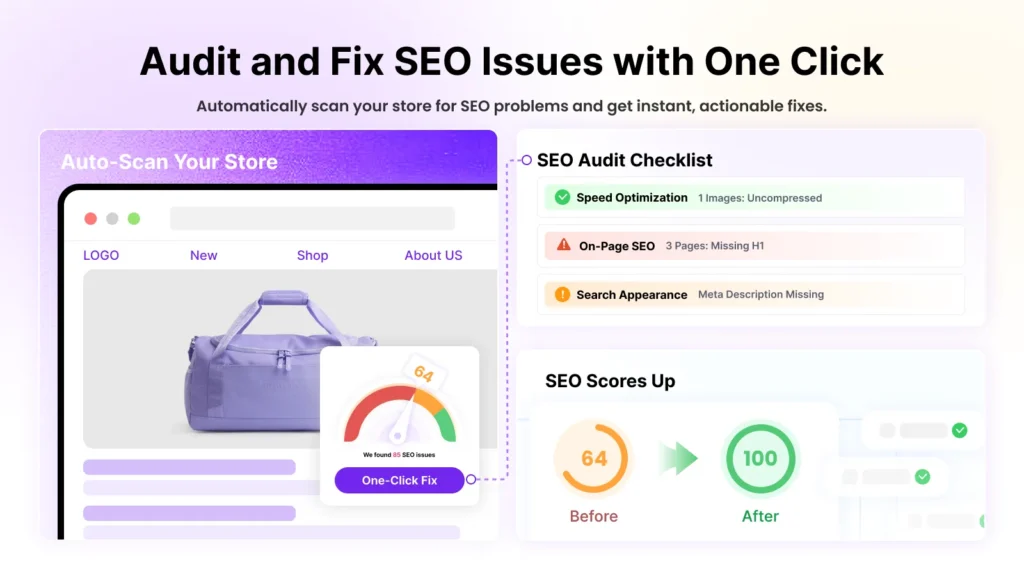
SEOWILL (formerly SEOAnt): Your AI Growth Engine in Google, ChatGPT, Claude and more.
- SEO checker that scans the store and returns AI action plans
- AI blog generator with topic and keyword ideas
- Page-speed work: image compression and lazy loading
- Bulk optimisation of meta tags, content and alt text on product pages
- Schema, llms.txt and FAQ blocks for AI answer engines
SEOWILL is the app on this list we would supervise most closely. Blogging is one module inside a full SEO suite, so you get topic ideas, drafts and a store-wide checker that explains each fix while it makes it, which is genuinely useful when nobody on the team does SEO. The one-star reviews describe real damage though: a Google Merchant Center suspension within 24 hours of aggressive automatic changes, alt text overwritten despite the opt-out, working URLs flagged as 404s, code left behind after uninstall, and a cancellation flow merchants call deliberately difficult. Use it, but approve every change yourself.
- Blogging sits inside a complete SEO suite, so posts and product pages get fixed together
- Guided action plans that teach while they fix
- Free plan, and the largest review base in this roundup
- Automatic changes have gone badly wrong for some stores, including a Merchant Center suspension
- Blog writing is shallower than the specialists here, and free credits run out fast
Best for: Stores that want blogging and technical SEO handled by the same app.
“Its a very easy to use app and since using it I have noticed our traffic increase and its so easy to create blogs each month.”Ae Botanicals, New Zealand
Avada AI Content Blog Builder
Write SEO-friendly AI blog posts in a minute with our AI content generator and drive organic traffic.
- AI article generation in several languages
- Live SEO suggestions against a target keyword as you write
- Built-in keyword research to pick the topic
- Manage, delete and sync posts back to your Shopify blogs
- AI outline generator to structure a post before writing it
Avada’s blog app splits the difference between a writer and a builder: keyword research, an AI outline, then an editor that syncs the finished article back into your Shopify blog. It is also the app whose support team gets named most often in reviews, and the free plan is enough to judge it properly. Formatting is where it runs out of road. Reviewers ask for the basics of layout control (resizing an image, coloured text, bordered blocks). One merchant left a blunter warning: the app deleted their content. Draft in it, then check the post before it goes live.
- Research, outline and writing in one flow, then straight into your Shopify blog
- Genuinely usable free plan
- Support that answers within minutes, by many accounts
- Layout control is thin: image sizing, text colour and block styling all get asked for repeatedly
- English-only interface, and at least one merchant reported losing content in the editor
Best for: Stores that want research, outline and draft in one flow, on a free plan generous enough to judge it.
“This has been a great solution for hosting blog content on our Shopify site! The builder is intuitive and has all the features we want. The customer support is responsive and helpful.”ProMaster, United States
Essential AI SEO: AI Blog Post
Generate SEO-optimized blog posts using an auto blog writer. Boost SEO and build professional blogs.
- Bulk generation: a batch of posts from a list of keywords
- Writes against the keywords you choose, not a generic topic
- Thirteen languages from the same brief
- AI image generation for the posts it drafts
- Designed to sit alongside blog builders rather than replace them
Bulk is the entire point here. Hand it a keyword list and it drafts a batch of articles at once, in thirteen languages, and it deliberately plays nice with the blog builders on this list instead of replacing them. Output quality gets praised more than we expected from a bulk tool. The reviews are almost uniformly positive, so the single honest dissent is the one worth repeating: you will still edit a lot, and for some stores that erases the time saved.
- Drafts a whole batch of posts from a keyword list in one go
- Thirteen languages, and it writes to your keywords rather than around them
- Built to run alongside a blog builder, not instead of it
- Bulk output still needs a real editing pass, which for some stores erases the time saved
- Interface only in English, even though it drafts in thirteen
Best for: Stores that need twenty posts this month, not one perfect one.
“The bulk generation feature makes it easy to handle large numbers of collections and blog posts efficiently. The interface is intuitive, and the output quality is strong for SEO-focused writing.”GUOCALI, France
Auto Blogs Agent AI Blog Posts
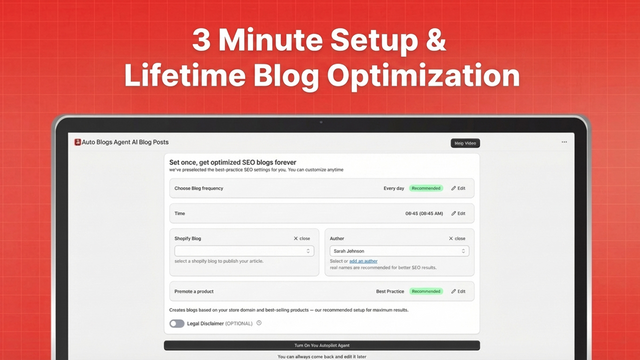
Autopilot AI blog agent with auto blogs automation SEO booster blogging articles blog posts SEO blog
- Writes and publishes SEO articles on a schedule, unattended
- Picks topics for your store's niche from keyword and Search Console data
- Adds internal links and target keywords to each article automatically
- Schema markup and Q&A blocks added to the posts it publishes
- Reads keyword data from Ahrefs, Moz, SEMrush and Search Console
Set the niche and the keywords and it takes over: writing, internal links, schema and scheduled publishing, with keyword and Search Console data steering the topics. Setup is what reviewers praise most, minutes rather than an afternoon, and the free plan lets you judge the output before paying. Where it thins out is nuance. A merchant selling to a specific community found the copy and the images missed the audience entirely, another counted one usable post a month and called it a waste of time, and a third just found it harder to drive than the listing suggests.
- Writing, internal links, schema and publishing all run on a schedule you set
- Topics chosen from keyword and Search Console data rather than guesswork
- Free plan, and setup measured in minutes by most reviewers
- A merchant selling to a specific community found the generated copy and images missed the audience entirely
- Output volume disappointed at least one store, one usable post a month by their count
Best for: Stores that want the blog on a schedule and will still read what goes out.
“I’ve been really impressed with Autopilot SEO. It’s extremely easy to set up and use, even if you don’t have a strong background in SEO or content creation.”My Eclectic Era LLC, United States
autoBlogger | AI Blog Writer
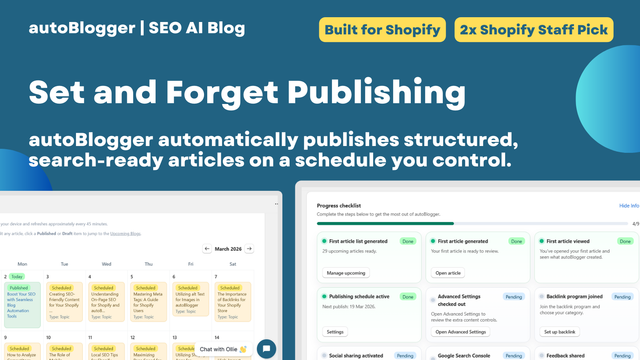
Automatically publish SEO-optimised AI blogs that link products, build authority and drive traffic.
- Automated publishing on a schedule you set
- Two modes: topic articles and product-focused articles
- Links each post to your products and to your older posts
- Seasonal campaign articles for Black Friday and other peaks
- Automatic sharing to Facebook and Instagram
autoBlogger is the automation we would choose if the point of the blog is to sell. It writes product-focused pieces, links them back to your catalogue and to your own older posts, runs seasonal campaigns around Black Friday, and pushes each article to Facebook and Instagram. The reviews from art, jewellery and equipment stores are the convincing ones, because the writing is clearly about their actual products. Older reviews flag the trade-offs: little editorial control, the same image reused across posts, American spelling with no British English option, and one merchant reported charges continuing after they uninstalled.
- Writes about your actual products, then links to them and to your older articles
- Seasonal campaigns and automatic social sharing included
- Structured output that reads well to search engines and AI assistants
- Limited control over tone and spelling variant, with repeated images reported
- One merchant reported being billed after uninstalling, so check your invoice when you leave
Best for: Stores that want the blog to be a sales channel, not a magazine.
“The software writes insightful articles about my artworks and manages complex, diverse, and engaging blog content with ease. It uses links to my older blogs and to my artworks.”Rhia Janta-Cooper Fine Art, United Kingdom
StoreSEO SEO & Image Optimizer
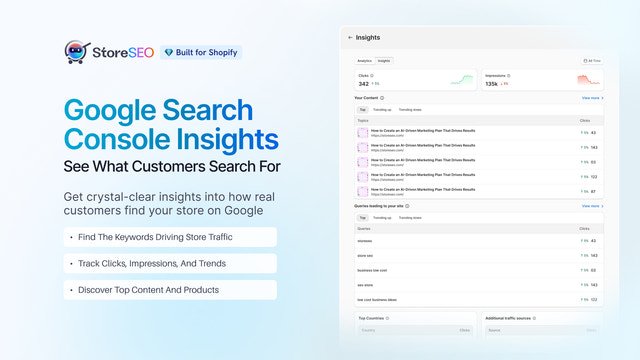
AI SEO Optimizer, SEO Booster, Blog, Schema & Image Optimizer to Boost Google Ranking & AI Traffic
- Scores blog posts, product pages and store pages against the same checklist
- AI meta titles, descriptions and blog content, editable in bulk
- Image compression, resizing and bulk alt text
- Search Console and Analytics connected, sitemaps submitted
- JSON-LD, FAQ schema and local SEO fields
StoreSEO is the pick when the blog is one line on a much longer SEO list. It scores articles, product pages and store pages the same way, writes meta and alt text in bulk, and now reports separately on classic search and on AI answer engines. Merchants with large catalogues are its happiest users, and support gets named as often as the features do. The complaints are about expectations and billing: it surfaces issues you still fix one at a time, one merchant describes credits consumed with nothing generated, and several more report charges that kept arriving after they stopped using it.
- One checklist across blog posts, product pages and store pages
- Strong bulk tools for meta tags and image alt text on big catalogues
- Reports split between classic search and AI answer engines
- It flags plenty that you still have to fix page by page
- Billing complaints recur, including charges that kept arriving after merchants stopped using the app
Best for: Larger catalogues where blog SEO and product SEO need the same treatment.
“StoreSEO is intuitive to use, quickly generates content like image alt text in bulk, and has a great responsive support team as well. Highly recommend if you have a large product catalog that needs SEO work done!”The Camera Store, Canada
DropInBlog: Blog Engine
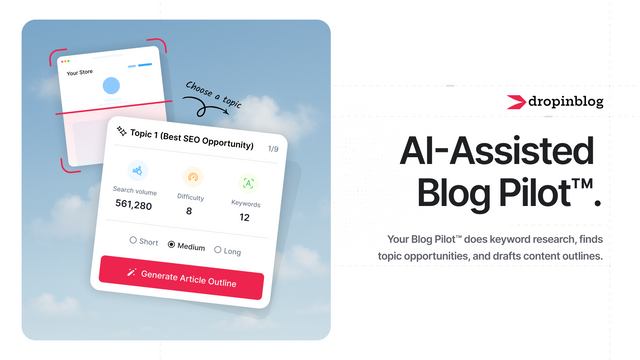
Turn blog traffic into sales with built-in SEO, embedded products, AI Blog Pilot.
- A full blog engine served inside your Shopify storefront
- AI keyword research, topics and outlines before you write
- Instant SEO feedback on the draft
- Product embeds with add-to-cart inside articles
- Author profiles and author pages for E-E-A-T
DropInBlog does not decorate Shopify’s blog, it replaces the engine. Posts live on their platform and get served inside your store, with SEO feedback as you write, product embeds with add-to-cart, and proper author pages for E-E-A-T. That architecture is also the catch. Bringing an existing blog across means 301-redirecting every old article, and leaving later means exporting everything back out. The other recurring theme is the bill: at $49 a month, several long-term users call it overpriced for the amount they publish, and a few find the editor clunky next to a visual builder.
- A real blog engine with authors, SEO checks and product embeds
- Strong SEO guidance built into the writing flow
- Support gets consistently good marks, including during migration
- Your posts live on their platform, so moving in and out means redirects and exports
- From $49 a month with no free plan, steep for occasional publishing
Best for: Stores treating the blog as a real publication and willing to pay for the engine.
“I highly recommend the DropInBlog as it is easy to use with a very helpful guide to maximising the SEO of each post.”Resinzwood Limited, New Zealand
BlogFeeder ‑ Blog Importer
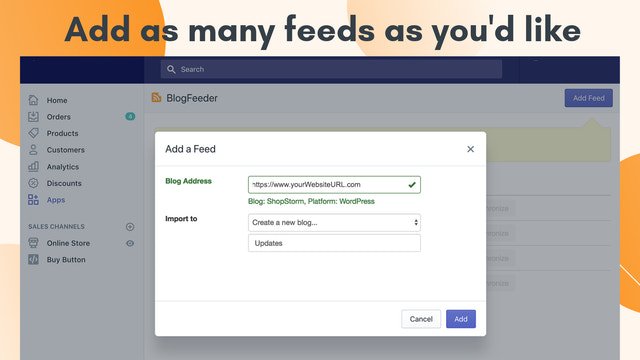
Enhance your blog experience by syncing posts from WordPress, Tumblr, Pinterest and other platforms.
- One-click import: paste the URL and it finds the feed
- Periodic auto-sync of new and updated posts
- Brings the content onto your own domain instead of a subdomain
If your content is already sitting on WordPress, this is the veteran that moves it: point it at a feed, it imports the posts, then keeps syncing new ones so your articles live on your own domain. It is also the one that needs checking at every step. Reviews describe partial imports, images left behind and slow syncs, one store ended up with thousands of duplicate posts, and support replies read as hit and miss. Import a handful first, check the images landed, then run the rest.
- The simplest path from a WordPress, Tumblr or Medium feed onto your Shopify domain
- Keeps syncing after the initial import, so both blogs stay in step
- Flat $9.99 a month, whatever the volume
- Partial imports and missing images come up repeatedly, so every migration needs checking by hand
- Sync is slow, and support has left several merchants waiting without a reply
Best for: Merchants moving or mirroring an existing WordPress blog onto their store domain.
“It's slow to sync, but it does what it says.”Ruth Tomlinson, United Kingdom
Digital Darts: Related Posts
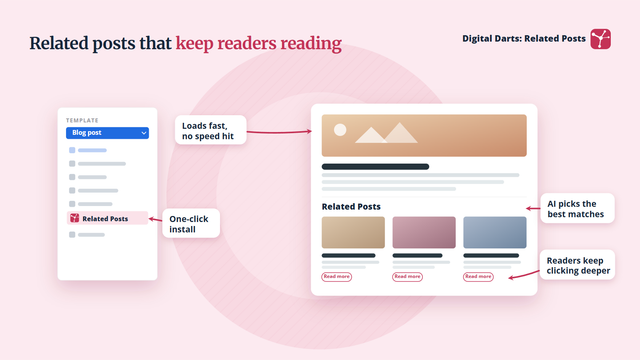
Boost blog SEO with AI related posts, internal links and title rewrites.
- AI picks the most relevant related post under every article
- Finds posts ranking between 4 and 20 in Search Console
- Rewrites low click-through titles and meta descriptions
- Spots readers close to buying and links them to the right product
- Suggests internal links and inserts them in one click
Behind a very plain name sits the most SEO-literate app in this group. It reads Search Console, finds the posts stuck between positions 4 and 20, rewrites the titles that collect impressions but no clicks, and drops a related-posts block under each article to keep readers moving. There is a real free plan. The 4.1 rating is earned honestly, though: the block does not always pick up your theme styles, with uneven images and awkward spacing in a couple of older reviews, and more than one merchant waited days on support without an answer.
- Targets the posts already close to page one instead of writing new ones
- Related posts, internal links and title rewrites in a single app
- Free plan that covers the related-posts block
- The block often needs restyling to match the theme, several merchants had to do it by hand
- Support has gone quiet on multiple reviewers for days at a time
Best for: Blogs with enough posts and Search Console history to have something to lift.
“Digital Darts Related Posts is a simple but very effective tool for improving internal linking on Shopify blogs. It helps surface relevant related articles automatically, which makes it much easier to keep readers engaged and guide them through more content.”Kiicity, Denmark
Blog Filter & Blog Search HUE
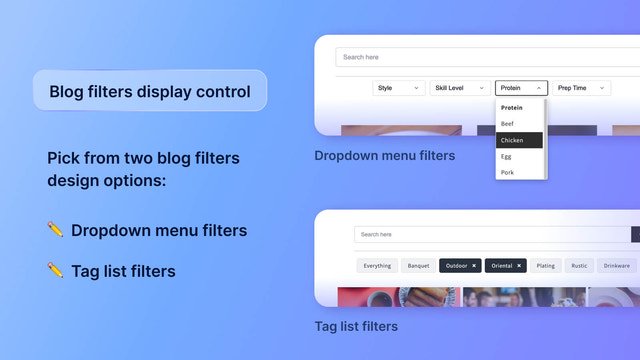
Blog browsing made easy with blog search & tag filter. See what customers like with search insights.
- Tag filter for your blog, as a dropdown menu or a tag cloud
- On-page search bar so readers can search your articles
- Insights into the keywords and tag combinations readers used
- Filter layout adapts to blog categories or a dropdown
- Works with posts written by any AI blog tool
Once you pass fifty posts, readers stop finding anything. Hue bolts a search bar and tag filters onto your existing blog, then shows you what people actually typed, which is a quietly excellent source of article ideas. Two thirds of its reviews are about the support, and the recurring story is the developer wiring the filter into your theme himself so it matches your design. We went digging for a substantive complaint in its 82 reviews and found one, from 2021, about a theme it would not fit. No free plan either, just five days to decide.
- Search and tag filtering on the blog, without touching your theme yourself
- Reader search terms surfaced back to you as topic ideas
- Theme integration handled by the developer rather than left to you
- Five days is a short trial for something you only judge once it is live in front of readers
- One merchant could not get it to fit their theme and got no reply, though that report is from 2021
Best for: Blogs big enough that readers need a way in other than the newest post.
“Great app. Works well. Easy to set up. Dependable; doesn't break down.”Prairie Oils & Vinegars, Canada
RuffRuff Table of Contents
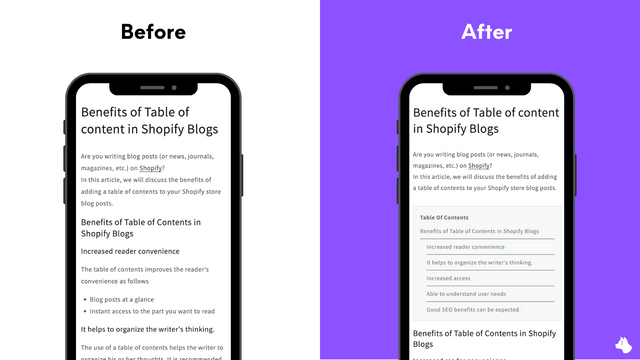
Auto-generate a table of contents from headings | Supports articles, products, collections and pages.
- Two-step setup: choose your headings, add the block to the theme
- Colours, numbering, indentation and collapse all configurable
- Real-time preview in the admin
- Works on articles, products, collections and pages
A table of contents is a small thing that changes how a two-thousand-word post reads, and this one builds it from your headings in two steps. Setup took minutes, and the preview means you never guess. The single dissenting review out of sixteen is fair warning: the default styling looks dated next to a well-designed theme, and customisation runs out before you stop wanting more.
- Automatic table of contents from your existing headings, no rewriting
- Works beyond the blog, on product, collection and page templates, from the paid plan
- Free plan covers the table of contents on blog posts
- Default styling looks dated on a polished theme, and customisation runs out quickly
- Interface only in English and Japanese
Best for: Long-form guides where readers need to jump to the section they came for.
“This works really well. Fast to setup, good customization, quick customer support. Blog looks better and navigation works well.”bareLUXE Skincare, Canada
Recipe Kit ‑ Blog Post Recipes

Add shoppable recipe cards with Google schema to your store blog & track which recipes drive sales.
- Shoppable ingredients that link straight to your products
- Recipe schema for Google rich results with star ratings
- Analytics per recipe: views, prints, shares and add-to-carts
- Nutrition labels generated from the ingredient list
- Custom recipe templates styled to your theme
Niche, and unbeatable inside its niche. If you sell food, this turns a post into a proper recipe card whose ingredients link to your products, with the schema Google needs for rich results with star ratings, auto-generated nutrition labels, and analytics down to add-to-carts per recipe. Stores running five hundred recipes have used it for years, which is the strongest signal on this page. Two limits worth knowing: the interface does not translate, so multilingual storefronts are stuck, and several fields are capped shorter than you would like.
- Ingredients that link to your products, so recipes actually sell
- Correct recipe schema and rich results without touching code
- Per-recipe analytics, including add-to-carts
- No interface translation, which rules it out for multilingual storefronts
- Character limits on fields like the recipe author and image alt text
Best for: Food, drink and CPG stores whose recipes are the reason people arrive.
“We have used Recipe Kit for several years now and have over 500 recipes posted on our blog through this app. We are so happy with the entire experience and can't recommend it enough.”Premier Catch, United States
So which would we install? Starting from zero, the one we reach for first is Bloggle, because Shopify’s editor is the real bottleneck, and Bloggle fixes it without moving your posts anywhere else. DropInBlog does more, but it takes your blog off Shopify entirely. If your bottleneck is finding the time to write instead, Tapita and Avada both take a keyword to a finished draft, and Auto Blogs Agent keeps the blog moving on its own for free. But publishing is the easy half. The posts that pay for themselves are the ones that link into your collections and products, which is why we run an internal linking pass over every blog we work on, next to the basics: page-level SEO checks, AI-written meta tags, and broken links cleared before they strand an old post. Every app on this page runs a free plan or a free trial, so install two, publish four articles, and let your own Search Console settle it.
Building out the rest of your stack? See our roundups of the best Shopify SEO apps and the best Shopify apps across every part of a store.
Star ratings on your product pages are their own category. If that is next, see the best Shopify review apps.
Once the posts are live, they need links into your collections and products. We compared the tools that place them in our guide to the best internal linking Shopify apps.
Shopify blog apps: quick FAQ
Does Shopify have a built-in blog?
Yes. Every store ships with a blog, and you can write posts, schedule them and even generate draft articles with Shopify’s own AI straight from the admin (Shopify Help Center). What you do not get is templates, a table of contents, author pages, related posts or a topic filter, and that gap is exactly what the apps on this page fill.
Do blog posts actually help a Shopify store rank?
They do when they answer a question your buyers are really asking. Google’s guidance is to create helpful, people-first content rather than pages written for search engines (Google Search Central). The second benefit is structural: every article is a new place from which to link to the collection or product it talks about.
Is AI-generated blog content against Google’s rules?
No. Google has said it rewards high-quality content however it is produced, and that its problem is content made mainly to manipulate rankings (Google Search Central). That is why every AI writer here is best treated as a drafting tool: generate, then edit before you publish.
Should I move my WordPress blog onto my Shopify store?
Usually yes, when the content is about what you sell, because it keeps readers on the domain where they can buy. An importer such as BlogFeeder pulls the posts across, and every old URL then needs a 301 redirect to its new address so the rankings follow (Google Search Central). Shopify creates those redirects from the admin (Shopify Help Center).
How many blog apps should one store run?
As few as possible. Apps that inject scripts or blocks into your storefront add page weight, and Google’s ranking systems look to reward pages that give a good page experience, Core Web Vitals included (Google Search Central). One writer or builder, plus one app for whatever is genuinely broken (navigation, related posts, internal links), is enough for most stores.